
AI connection for geological modelling (MCP)
Premium
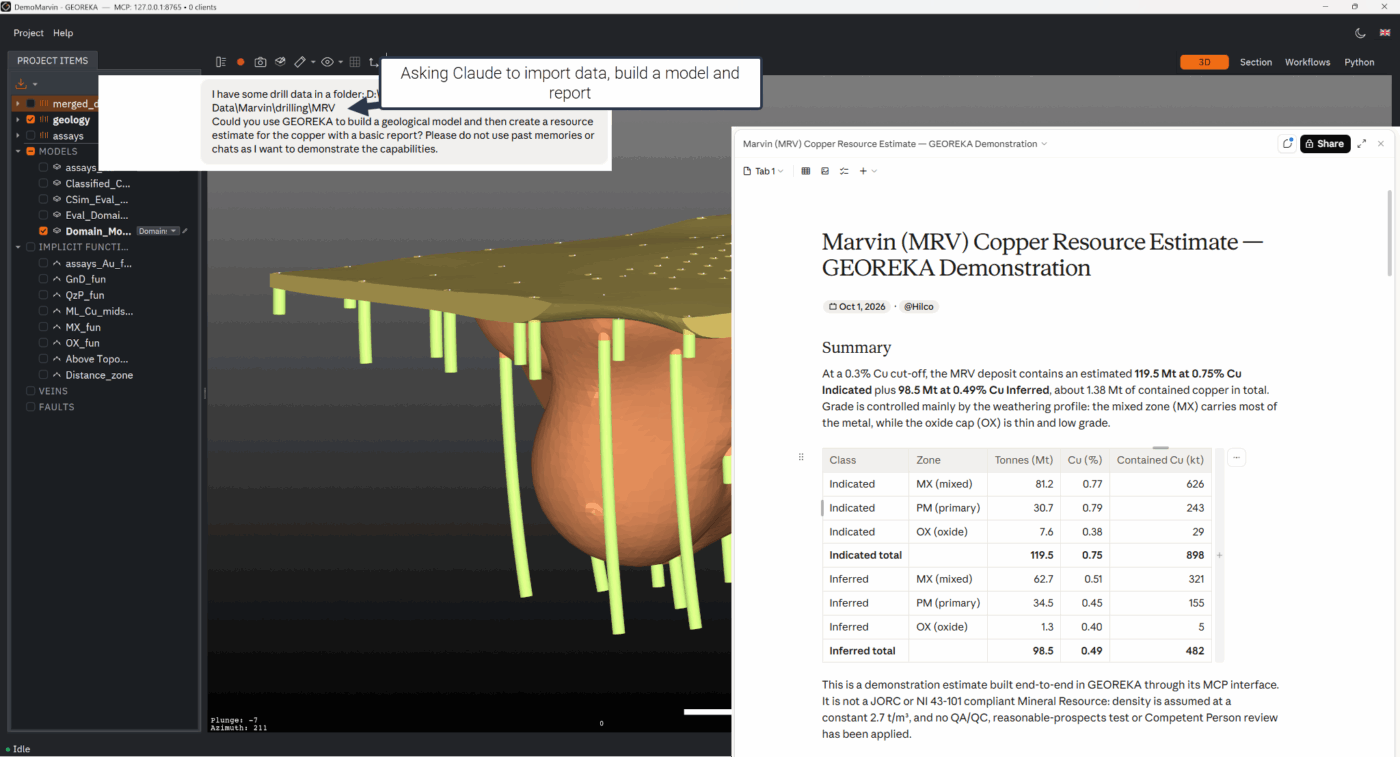
GEOREKA includes a built-in Model Context Protocol (MCP) server, so an AI assistant such as Claude can import data, build models, run analyses and export results directly in your live GEOREKA project.
You describe what you need in plain language. The assistant calls GEOREKA’s own tools to do it, and every step runs through the same engine and workflows you use by hand. The server runs on your computer, is protected by a token, and is switched on only when you enable it in Settings. It is part of Premium, and setup takes a few minutes with the Skill.md file that ships with the software.
How it works
Ask, act, check
- AskDescribe the task in plain language: import these drillholes, composite to 2 m, interpolate the gold domain.
- ActThe assistant calls GEOREKA tools to import, model, analyse and export. Long jobs run in the background and report back.
- CheckReview the result in the 3D view like any other model. Screenshots and the saved project show what was done.
- RepeatKeep the workflow and the scripts, and run them again on new data.
What it can do
What an AI assistant can do in GEOREKA
Projects and data
List and inspect objects, import drillholes (CSV and Excel with column mapping), points, surfaces, polylines, grids, GIS and structural data, and save the project.
Models and interpolation
Create models and interpolate from points, surfaces, polylines, structural data and drillholes. Evaluate implicit functions on a block grid. Composite drillholes before you estimate.
EDA and variography
Summary statistics and histograms, and experimental variograms over a point set, filtered by domain.
Workflows
Open, describe and run node-based workflows, including ones the assistant writes as JSON.
Python in GEOREKA
Run Python inside GEOREKA’s embedded interpreter. Every script is archived in the project, so the work is repeatable.
Views and exports
Take screenshots, set the camera and export STL, OBJ, DXF, CSV, block model CSV and VTK.
Examples
Things you can ask
- Import the collar, survey and assay files in this folder and tell me what is in the project.
- Composite the gold assays to 2 m, then interpolate and show me a section.
- Compute summary statistics for copper in the main domain and plot the histogram.
- Build a variogram for zinc and report the sill and range.
- Export the final surfaces as DXF and take a screenshot from the north.
Setup
Connect your AI assistant
- EnableIn GEOREKA, open Settings, then the MCP tab, and switch the server on.
- Copy the tokenGEOREKA generates a token on first launch. Copy it from the same tab.
- Add the Skill.mdAdd the Skill.md file that ships with GEOREKA to your AI assistant. It tells the assistant how to connect and which tools exist.
- ConnectPoint the assistant at the local server. Clients that speak stdio, such as Claude Desktop and Claude Code, use the bridge below.
Connection settings
| Setting | Value |
|---|---|
| URL | ws://127.0.0.1:8765/mcp |
| Authentication | Authorization: Bearer <token> |
| Port | 8765 by default, configurable |
| Protocol | JSON-RPC 2.0 over WebSocket (MCP) |
For stdio clients, run the bridge adapter:
python bridge/mcp_stdio_ws.py --url ws://127.0.0.1:8765/mcp --token <your-token>Control
Local, protected and recorded
Runs on your computer
The server listens on 127.0.0.1 and is off until you enable it. Your project files stay on your machine. Your AI assistant sends what you type and the tool results to its own model provider, so choose a provider that suits your data policy.
Token protected
Every connection needs the token from Settings. Keep it private, like a password.
Contained
By default the assistant can only write exports and screenshots inside the project folder. Names never overwrite: a new object with an existing name gets a numbered suffix.
Auditable
Scripts the assistant runs are archived with a timestamp in the project, and results are ordinary GEOREKA objects you can inspect.
Plans
Included in Premium
The MCP connection and the Python console are part of Premium, along with exploratory data analysis, variography, cross-validation, conditional simulation and classification. The 14-day trial includes every feature, so you can try the connection on your own data.
Questions
AI and MCP FAQ
What is MCP?
The Model Context Protocol is an open standard that lets AI assistants use tools in other applications. GEOREKA runs an MCP server, so an assistant can operate GEOREKA the way a user does.
Which AI assistants work with it?
Any MCP-capable client. Claude Desktop and Claude Code connect through the bridge adapter, and other clients can connect directly over WebSocket.
Does my data leave my computer?
The MCP server listens only on your computer. Your AI assistant does send your prompts and the tool results it reads to its model provider, so check that provider’s terms for confidential data.
Do I need to write code?
No. You describe the task in plain language. The assistant uses GEOREKA’s tools and can write Python if it needs to.
Is it part of Core?
The MCP connection and the Python console are part of Premium. The 14-day trial includes everything.
Can the assistant damage my project?
It works on the open project through a defined set of tools. A new object with an existing name gets a numbered suffix instead of replacing the original, and writing outside the project folder is blocked by default. Save a copy of important projects before long automated sessions.
Get started
Let your assistant do the repetitive work
Try the MCP connection on your own project in the 14-day trial.