
Automating geological modelling with the GEOREKA Python console and MCP connection
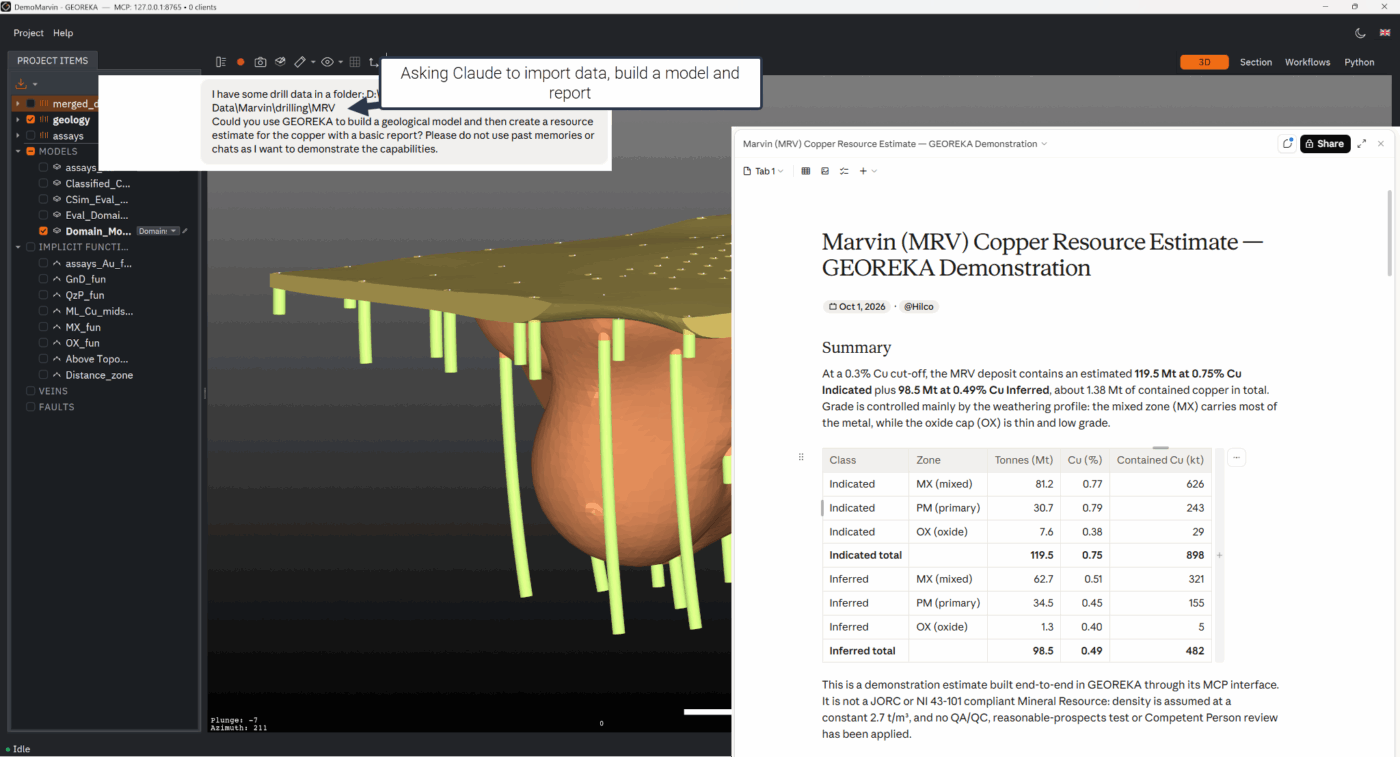
GEOREKA’s Python console and its MCP connection let you script repetitive modelling steps, or let an AI assistant carry them out, while the geologist remains responsible for the interpretation.
Much of the time in a resource project goes into set-up and data preparation: importing drillholes, compositing, building domains, interpolating, exporting. These steps can be scripted or delegated to an AI assistant through MCP, the Model Context Protocol. An assistant cannot interpret structure for you. What it can do is run the legwork on your instruction, record exactly what it did, and let you review every step.
What can be automated
Through the MCP connection, an assistant has access to the same building blocks you use in the application. Examples include:
- Importing drillholes from CSV or Excel, with column mapping, and importing points, surfaces, polylines, grids and structural data.
- Compositing drillholes and extracting mid-points.
- Building domains from drillholes, creating model grids and interpolating on points, drillholes, surfaces, polylines and structural data.
- Running variograms, descriptive statistics, swath plots, conditional simulation and grade-tonnage calculations.
- Exporting results as CSV, DXF, STL, OBJ, VTK and other formats, and saving screenshots of the 3D view.
Long operations run as jobs
Heavy operations such as interpolation and simulation run in the background. The assistant starts a job, then checks its status until it is done. Only one interpolation runs at a time. This keeps the application responsive and means that a long run is not lost when a client times out.
The Python console
The Python console runs scripts inside the project, which is useful for custom checks, summaries and one-off calculations that are not worth a menu item. Scripts are archived with the project so that a result can be traced to the code that produced it. Because scripts can read and change project data, the console is opt-in and needs a saved project.
Keep the geologist in the loop
- Interpretation stays yours. Contacts, structural style and domain definitions are geological decisions. An assistant can prepare, run and report, but it does not know the geology unless you tell it.
- Everything is recorded. Each operation is recorded as a workflow in the project, so you can open it, review it and re-run it when new data arrives.
- Check the output. Validate automated results exactly as you would your own, see validating a resource estimate.
- Mind your data. When you connect an AI assistant to a project, consider what data it can see and where it is processed, and follow your organisation’s data policy.
Automate the legwork, not the judgement. Scripts and assistants can set up, run and report in minutes what takes hours by hand, and the recorded workflow lets you check every step.
Apply it
Automate your own workflows
The Python console and the MCP connection are part of Premium. Geological modelling in GEOREKA →
Common questions
Automating modelling with Python and MCP FAQ
What is MCP?
The Model Context Protocol is an open standard that lets an AI assistant call tools in another application. In GEOREKA it gives an assistant access to import, modelling, estimation and export operations.
Can an AI assistant build my geological model?
It can set up and run the steps you instruct, and report on them. It does not interpret the geology, so domain definitions, structural style and sign-off remain with the geologist.
Can I review what the assistant did?
Yes. Operations are recorded as workflows in the project, which you can open, review and re-run.
Is it included in the trial?
Yes. The 14-day trial includes every feature, including Premium.